

Expo SDK — install + setup
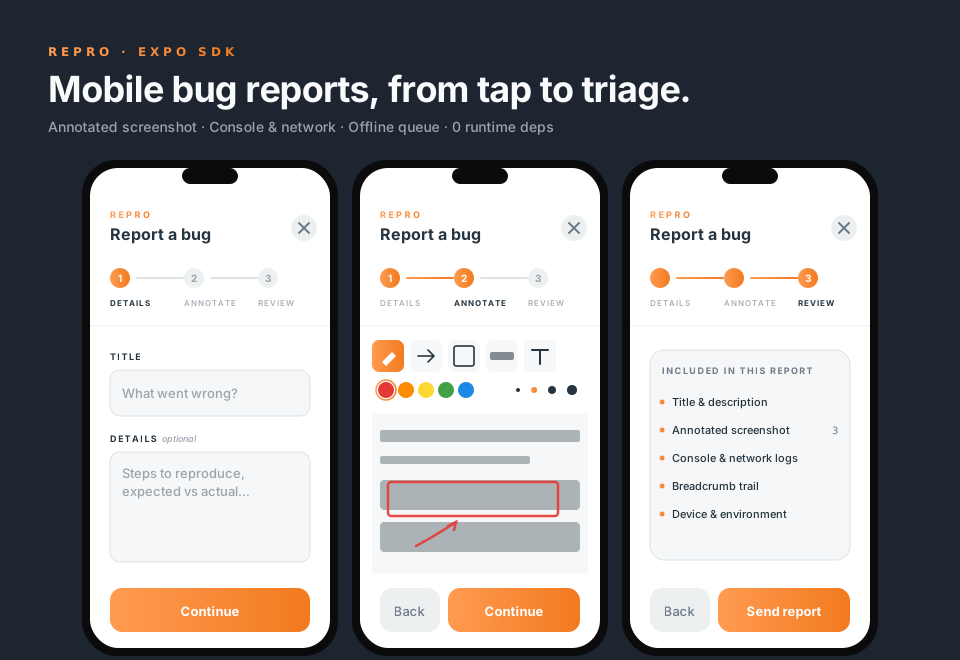
@reprojs/expo drops a floating bug-report launcher into any Expo app. Reporters tap, annotate a captured screenshot, add context, and submit — the SDK bundles the annotated image plus console logs, fetch requests, breadcrumbs, and device info, and POSTs it to your Repro dashboard.
Not session replay. The mobile SDK does not record DOM — it captures a single screenshot + logs. That keeps the bundle small and the privacy story simple. The web SDK (@reprojs/core) is where replay lives.
Before you install: dashboard setup
The SDK needs two values from your running dashboard. Both come from the project you want reports to land in.
Create a project — dashboard → Projects → New project.
Generate the embed key — open the project → Settings → Security tab → Public SDK key.
A brand-new project has no key yet — the field reads
(not generated). Click Rotate key once to mint the firstrp_pk_…value, then copy it. Only a project owner (or an install admin) can do this.Leave the origin allowlist empty. Mobile apps send no
Originheader, so there is nothing to allowlist. The intake endpoint accepts a report with no origin when its context sayssource: "expo", which the SDK always sets. Adding web origins later for a browser SDK does not break your Expo app.
The second value is your intake URL — your dashboard's origin plus /api/intake (the SDK appends /reports itself).
Reaching the dashboard from a device
localhost means the device, not your laptop, so which host you use depends on where the app runs:
| Running on | intakeUrl host |
|---|---|
| iOS Simulator | http://localhost:3000 — the simulator shares your Mac's network stack |
| Android Emulator | http://10.0.2.2:3000 — the emulator's alias for the host machine |
| Physical device (iOS or Android) | http://<your-LAN-IP>:3000, e.g. http://10.0.0.42:3000. Phone and laptop must be on the same network |
Plain http:// works in debug/dev builds on both platforms: Expo's generated iOS Info.plist sets NSAllowsLocalNetworking, and the generated Android debug manifest sets android:usesCleartextTraffic="true".
That flag is debug-only. A release build has no cleartext exemption, so a production intakeUrl must be https://. normalizeConfig rejects anything that isn't http(s):// outright.
Install
# From inside your Expo app (not the monorepo root)
npx expo install @reprojs/expo \
  react-native-view-shot react-native-svg react-native-gesture-handler \
  @react-native-async-storage/async-storage @react-native-community/netinfo \
  expo-device expo-constants \
  expo-document-picker expo-image-picker
expo install picks versions matching your Expo SDK channel.
Minimum versions
| Peer | Minimum |
|---|---|
expo | 52.0 |
react-native | 0.74 |
react | 18.3 |
react-native-view-shot | 3.8 |
react-native-svg | 15 |
react-native-gesture-handler | 2.16 |
@react-native-async-storage/async-storage | 1.23 |
@react-native-community/netinfo | 11.3 |
expo-device | 6 |
expo-constants | 16 |
expo-document-picker | any (matches your Expo SDK) |
expo-image-picker | any (matches your Expo SDK) |
Add the config plugin
In app.json (or app.config.ts), add @reprojs/expo to the plugins array:
{
  "expo": {
    "plugins": ["@reprojs/expo"]
  }
}
The plugin is a no-op in v1 — it exists so that future native additions (camera-roll permission strings, bundle-id allowlist) don't require a breaking migration.
Wrap your app root
Anywhere near the top of your React tree (typically app/_layout.tsx with expo-router):
import { ReproProvider, ReproLauncher } from "@reprojs/expo"
import { GestureHandlerRootView } from "react-native-gesture-handler"

export default function RootLayout() {
  return (
    <GestureHandlerRootView style={{ flex: 1 }}>
      <ReproProvider
        config={{
          projectKey: process.env.EXPO_PUBLIC_REPRO_PROJECT_KEY ?? "",
          intakeUrl: process.env.EXPO_PUBLIC_REPRO_INTAKE_URL ?? "",
        }}
      >
        <YourApp />
        <ReproLauncher />
      </ReproProvider>
    </GestureHandlerRootView>
  )
}<ReproProvider>must be inside<GestureHandlerRootView>— the annotation canvas needs gesture-handler at the root.<ReproLauncher />is opt-in. You can also trigger the wizard imperatively viauseRepro().open()orRepro.open().
Silent disable
Both projectKey and intakeUrl default-to-empty via process.env.X ?? "". When either is empty, the entire SDK disables itself silently — no collectors start, no launcher renders, useRepro().disabled is true and all methods no-op. This is the idiomatic "turn it off in prod / turn it on in staging" switch:
# .env.development
EXPO_PUBLIC_REPRO_PROJECT_KEY=rp_pk_xxxxxxxxxxxxxxxxxxxxxxxx
EXPO_PUBLIC_REPRO_INTAKE_URL=http://10.0.0.42:3000/api/intake

# .env.production — leave blank to skip Repro entirely
A typo'd non-empty key (say rp_pk_shortkey) still throws a Repro: invalid projectKey shape at provider mount, so you don't accidentally ship a silently-disabled build.
EAS: scope the vars to every environment you build
EXPO_PUBLIC_* values are inlined at build time, and EAS environment variables are scoped per environment (development / preview / production). A variable that exists only in development and preview is simply absent from a build whose profile declares "environment": "production" — so the SDK sees an empty string and silently disables itself.
The failure mode is nasty precisely because nothing looks broken: the app builds, ships, and runs, but the launcher never renders and no report is ever sent.
Check what each environment actually has:
eas env:list --environment productionand add the pair anywhere it's missing:
eas env:create --environment production --name EXPO_PUBLIC_REPRO_INTAKE_URL --value "https://your-dashboard.com/api/intake"
eas env:create --environment production --name EXPO_PUBLIC_REPRO_PROJECT_KEY --value "rp_pk_..." --sensitive
Map every build profile in eas.json to the environment it declares — including profiles that inherit one via extends — and confirm the pair exists in each. Because the values are baked into the binary, an OTA update cannot repair an already-built app; you need a new build.
Marking the key sensitive hides it from EAS build logs, but EXPO_PUBLIC_* is compiled into the JS bundle regardless — it ships inside the app. That's fine for this key (intake validates it server-side and rate-limits per project), just don't treat it as a secret.
First report
npx expo run:ios(orrun:android) — Expo Go is not supported becausereact-native-view-shotneeds a dev build.This is a native build, so the platform toolchain has to be complete: iOS needs Xcode plus its iOS platform component (Xcode → Settings → Components) and a matching simulator runtime; Android needs an AVD created in Android Studio's Device Manager (a bare
cmdline-toolsSDK ships with no system image). See Troubleshooting ifrun:ios/run:androidcan't find a device.Tap the flame-orange bug button.
Fill out title + description → Continue.
Annotate the captured screenshot with the pen/arrow/rect/highlight/text tools, or pick the cursor tool to reposition something you already placed → Continue.
Review what's included → Send report.
The report lands in your dashboard's inbox with a Mobile / iOS / Android platform pill and a mobile-specific device card.
Moving an annotation
The last button in the annotation toolbar is the cursor tool. With it active:
- Tap a shape to select it — a dashed outline appears around it.
- Drag the shape to move it. Text labels, arrows, rectangles, highlights and pen strokes all move.
- Tap empty canvas to deselect.
A move is a single undo step, so Undo puts the shape back where it was instead of deleting it. Shapes cannot be dragged off the canvas, and the selection outline is never part of the submitted PNG. Shapes are grabbed by their ink: an arrow or pen stroke responds near the line itself, while rectangles, highlights and text can be grabbed anywhere inside them.
Resizing and rotating are not supported — redraw the shape instead.
Draggable launcher
The launcher drags AssistiveTouch-style: free movement during the drag, and on release it springs to the nearest screen edge (left, right, top, or bottom) with the position along that edge preserved. It can never end up parked in the middle of the screen. The chosen edge + along-axis position persists across app restarts via AsyncStorage.
Pass position as the initial corner before the user has dragged it; after the first drag, the persisted position takes over. Disable dragging entirely with draggable={false} to pin the launcher to position:
<ReproLauncher draggable={false} position="top-right" />What gets captured
- Screenshot — single annotated PNG. Flattened client-side into a transparent-letterbox PNG so the host app's dark surface shows through on the dashboard.
- Console — last 200 entries of
console.log / info / warn / error / debug. Stack traces on warn + error. - Network — last 100
fetchcalls. Method, URL, status, duration, bytes, headers. Headersauthorization,cookie,x-api-keyare redacted by default. XHR patching is v1.1. - Breadcrumbs — custom events via
useRepro().log(event, data). Last 50. - Device — iOS/Android, OS version, device model, app version + build, locale, timezone, viewport + screen size, DPR, connectivity (
4g,wifi, etc.).
Offline queue
Reports that fail to POST (no network, 5xx, etc.) are persisted to AsyncStorage under @reprojs/expo/queue/v1 (max 5 reports or 10 MB, whichever first). They retry with exponential backoff when:
NetInforeports online after being offline- The app comes to foreground (
AppStatechange) - The host calls
useRepro().queue.flush()manually
The queue is not encrypted — documented privacy tradeoff for v1. Don't use as a session vault for secrets.
Troubleshooting
TypeError: null is not an object (evaluating 'RNViewShot.captureRef')— the nativeview-shotmodule isn't linked. Runnpx expo prebuild --clean && npx expo run:iosafter installing the peer deps.Origin header required(403 on submit) — your dashboard is an older build without the Expo-source relaxation. Update to a version that includes the additive intake changes.Submission too fast(400) — the server's dwell gate (default 1000 ms) didn't pass. The SDK clamps to ≥1000 ms so this is only seen if you're running an older SDK build.- Wizard opens but screenshot area is blank —
react-native-view-shotreturned without an error but produced a black frame. Usually resolved by dismissing the keyboard before opening the wizard. - Annotations don't appear in the submitted PNG — older SDK bug; update to ≥0.1.0.
- Nothing draws on the screenshot in the Annotate step (Android only) — fixed in 0.3.5, upgrade. On Android a react-native
Modalis a separate native window that sits outside your app'sGestureHandlerRootView, so gesture-handler received no touches inside the wizard and the canvas ignored every stroke. The toolbar still responded, which makes this look like a broken canvas rather than a dead gesture. iOS was unaffected. xcodebuild: error: Unable to find a destination matching the provided destination specifier/iOS <version> is not installed— Xcode is installed but its iOS platform component isn't, so no iOS destination is eligible (not even a booted simulator). Install it via Xcode → Settings → Components, or runxcodebuild -downloadPlatform iOS. Confirm withxcodebuild -workspace ios/<app>.xcworkspace -scheme <app> -showdestinations— if every entry is listed as "Ineligible", the platform is the missing piece, not your config.run:androidfails with no emulator —emulator -list-avdsprinting nothing means no AVD exists. Create one in Android Studio → Device Manager (this downloads a system image), or plug in a physical device with USB debugging on.- Report never arrives and the app logs a network error — you're almost certainly pointing at the wrong host. Re-check Reaching the dashboard from a device: an Android emulator cannot resolve
localhostto your laptop, it needs10.0.2.2. - Reports silently never arrive on Expo SDK 56+ (
Unsupported FormDataPart implementation) — fixed in the SDK release following 0.3.2. From SDK 56 Expo replaces the globalfetchwith its WinterCG implementation, which rejects React Native's{ uri, name, type }file shorthand. Because the failure is a thrown error with no HTTP status, the queue retried 10× and discarded the report while the wizard reported success. Upgrade the SDK, or as a stopgap setEXPO_PUBLIC_USE_RN_FETCH=1and rebuild. Reports without attachments were unaffected, which makes this look like a flaky backend. - The launcher never appears in a released build (but works in internal/TestFlight builds) — the SDK silently disabled itself because
projectKeyorintakeUrlcame through empty. On EAS this almost always means the variables are scoped todevelopment/previewbut not to the environment your release profile declares. Runeas env:list --environment productionand see EAS: scope the vars to every environment you build. Rebuild afterwards — an OTA update can't fix a baked-in value. (not generated)where the project key should be — the project has never had a key minted. Open the project's Settings → Security and click Rotate key once.
Next
- API reference — all props, hooks, and types
- Architecture — how the SDK and dashboard talk
- Self-host the dashboard — where reports land